When buyers compare options across crowded digital channels, your video can help them stay, trust your brand, and take the next step. Professional production makes it easier to capture attention, explain your value, and guide prospects toward action. But polished visuals alone won’t bring in more customers. Match each video to a specific goal: use a short explainer to build awareness, a product demo to help buyers evaluate their options, or a clear call to action to encourage an inquiry or purchase. Start by deciding who you want to reach and what you want them to do next.
Use Professional Video to Win Attention
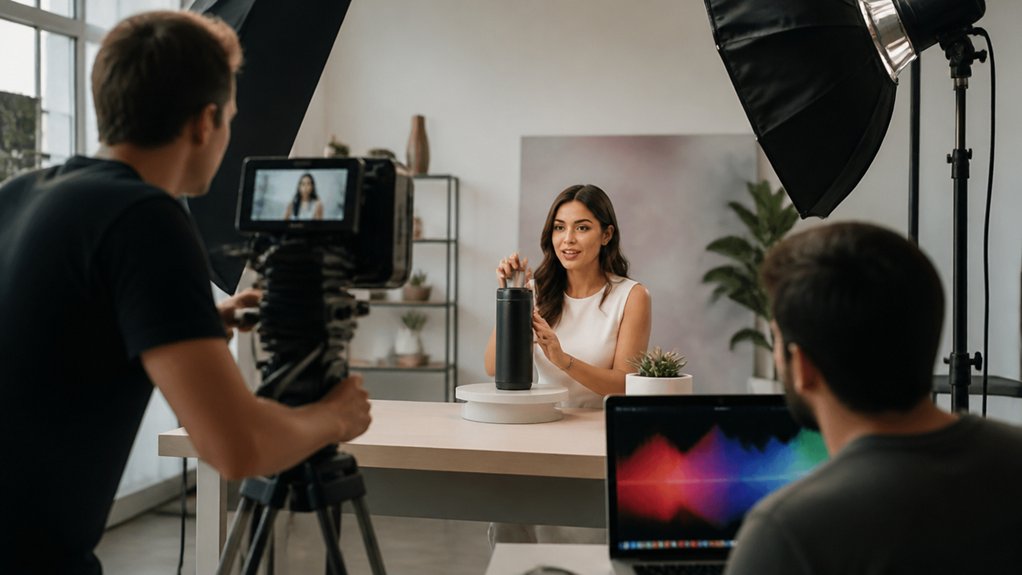
Professional video helps your business win attention by showing prospects why your offer matters before they scroll past. Start with a problem your customers recognize, then show how your product or service solves it.
For example, a local contractor could use a short video to show a repair from start to finish and explain what the customer can expect.
Keep the message focused: use a strong opening visual, highlight one clear benefit, and support your claims with real proof, such as a product demonstration or customer testimonial.
Choose music and editing that fit your brand, and make sure the sound is clear.
Then track video completion rates, qualified inquiries, and conversions. Use what you learn to improve your next video and attract more of the right customers.
Optimize Videos for Search and Social Discovery
Help more prospects find your videos by optimizing them for the platforms where your audience searches and scrolls.
- Use the words your customers search for. Include relevant phrases in video titles, descriptions, and tags. For example, a local plumber might use “how to fix a leaky faucet” in a helpful tutorial.
- Add captions and transcripts. Accurate text helps search engines understand your video and lets viewers follow along with the sound off.
- Fit each platform. Adjust video length, format, thumbnail, and opening frame to match platform requirements and viewing habits.
- Test and improve. Try different titles or thumbnails, then compare views, watch time, and click-through rates.
- Invite viewers to share. Add a clear prompt, such as “Share this with someone planning a kitchen remodel.”
- Review results by channel. Identify which videos attract qualified prospects, refine your approach, and invest in the formats that work.
Build Trust With Brand Videos
Discovery brings prospects to your videos. Trust gives them a reason to choose your business. Use brand videos to show the people, values, and decisions behind your company. For example, share a customer explaining how your service solved a real problem, or film your team preparing for a busy day.
Start with one audience insight: What do your prospects want to know before they buy? Build a clear story around that question, and use real moments to make your values memorable. Keep your tone consistent across channels so people recognize your business and know what to expect.
Track video completion rates, return visits, and branded searches to see which stories connect with viewers. Then make more videos like the ones your audience responds to.
Explain Your Offer With Product Videos
Product videos help turn interest into action by showing customers what you offer and why it matters. Focus on the benefits they care about, then demonstrate your product in use—for example, show how to set it up, use a key feature, or solve a common problem.
Track views, engagement, and conversions to learn which videos help move prospects toward a purchase.
Showcase Key Benefits
Showcase the benefits that matter most to your target audience. Show how your offer solves a real problem, such as saving time, lowering costs, or reducing risk.
Back up your claims with customer feedback, performance data, or credible research. Then use simple visuals and clear narration to connect each benefit to a practical business outcome.
Keep your brand consistent across videos so buyers recognize your message, trust your business, and see the value of your offer across channels.
Demonstrate Product Use
Show prospects exactly how your product works, and make it easier for them to decide whether it’s right for them. A product demo can turn features into visible proof, answer common questions, and address concerns before they slow a purchase.
Keep each video focused on a few key steps. For example, show how to set up an account, complete a common task, or solve a problem your customers face. Pair demos with tutorials that guide users through setup and everyday tasks.
Track video completions, clicks, and conversions to see which topics help viewers take the next step. Then adjust the pacing, calls to action, or content based on what you learn.
When customers can quickly understand how to use your product, they’ve more confidence moving forward.
Turn Video Views Into Qualified Leads
Views build awareness, but a clear next step turns interest into leads. Give each video one focused call to action: book a consultation, request a demo, or download a guide.
Reach the right viewers with Audience targeting based on their roles, needs, and likely intent. Then use Content personalization to match the landing page and follow-up message to the video they watched.
For example, someone who watched a product demo could land on a page with a trial offer, while someone who watched a how-to video could receive a related guide.
Track click-throughs, form completions, and lead quality for each campaign. Use what you learn to improve your videos, placements, and offers—and invest in the ones that bring in qualified leads.
Use Customer Stories to Ease Buying Concerns
Customer stories can ease buying concerns by showing how a solution works in situations prospects recognize. Share customer testimonials that explain the challenge, why the customer chose your product, how they put it to work, and what changed.
Customer stories help prospects see how your solution addresses familiar challenges and delivers meaningful change.
When prospects hear peers describe the buying process, implementation, and results, they can better picture their own path.
Choose case studies that match your prospects’ industry, company size, or use case. Include verified results—such as time saved, costs reduced, or more conversions—and explain the starting point and how the customer measured the outcome.
Use clear visuals and authentic interviews to make the story easy to follow. Address common objections directly, so prospects can judge whether your solution is right for them and take the next step with confidence.
Measure Video’s Impact on Customer Acquisition
Track whether your videos help turn prospects into customers. Start with engagement signals: watch time, completion rates, and clicks. For example, if viewers leave before your product demo or skip the call to action, revise the video or move it to a more visible spot.
Next, connect video exposure to business results, such as qualified leads, demo requests, and purchases. Compare performance across landing pages, campaigns, and audience segments, and use the same attribution window for each comparison. Don’t judge success by views alone—check whether video viewers move into your pipeline and generate revenue.
Use what you learn to improve the message, placement, and call to action. Change one element at a time and compare results with a clear baseline. This gives you a practical way to see where video supports customer acquisition.
Choose a Video Production Partner for Your Goals
Choose a video production partner who understands your acquisition goals—not just one with an impressive showreel. Ask how they’ll tailor the concept, video formats, and calls to action for your audience and each stage of your funnel.
For example, a short social video might introduce your offer, while a product demo helps interested prospects decide.
Ask to see case studies with clear business outcomes, such as qualified leads, conversion rates, or lower acquisition costs. Discuss your budget early, then compare proposals based on deliverables, testing options, and expected value—not price alone.
Before you sign, confirm the timeline, approval milestones, and number of revision rounds.
The right partner will connect creative choices to performance data and help you improve your videos based on what drives results.
Frequently Asked Questions
What Equipment Is Needed to Produce Professional Videos In-House?
Start with a capable camera, quality microphones, and good lighting. Add a tripod or other stabilizer, headphones for checking audio, editing software, and backup storage. Prioritize sound and lighting first: a clear voice and well-lit image make a stronger impression than an expensive camera. Before buying, list the videos you plan to make and choose equipment that fits your space, budget, and workflow.
How Long Does a Typical Video Production Project Take?
A typical video project takes four to eight weeks, depending on its scope, review process, and production needs. Planning the storyboard, choosing talent, scheduling the shoot, filming, and editing all take time. To keep your project on track, set a clear deadline, choose a decision-maker, and gather feedback promptly at each review stage.
What Video Formats Work Best for Different Platforms?
Choose vertical 9:16 video for TikTok, Instagram Reels, and YouTube Shorts. Use square 1:1 or portrait 4:5 for Instagram feed posts. For standard YouTube videos and website players, use horizontal 16:9. Before publishing, check that text, logos, and key visuals fit the frame, then preview the video on each platform. The right format helps your video display as intended, but it can’t guarantee engagement.
How Can Businesses Manage Video Production Costs?
Manage video costs by planning each shoot around the footage you truly need. List the essential shots, reuse strong footage in multiple videos, and group scenes by location or setup so you can film them in one session. Track the cost of each finished video, then put more of your budget toward formats that help you reach clear business goals, such as product demos that support sales or short clips that drive website visits.
What Legal Permissions Are Needed When Filming People or Locations?
Get signed model releases from recognizable people and permission from property owners or local authorities before filming. For example, ask a business owner before recording inside a shop, and check whether you need a city permit to film on a public street. Before you shoot, confirm local filming rules, privacy laws, and any union requirements. Rules vary by location, venue, and how you plan to use the footage.
Conclusion
Professional video can do more than showcase your business—it can help you attract and win customers. Use a short product demo to show how your offer solves a real problem, a customer testimonial to build trust, or an explainer video to make a complex service easier to understand. End each video with a clear next step, such as booking a consultation, requesting a quote, or visiting a product page.
To see what’s working, track qualified leads, conversion rates, and customer acquisition costs. Use those results to improve your message, call to action, and distribution. Choose a production partner who understands your goals and audience, then create videos that support your sales process from first impression to purchase.